
Massive Adds x402 Payments Access for AI Agents with Coinbase
Massive US stock data is now available to AI agents via x402. Pay per request in USDC on agent.massive.com, with no account or API key. Built with Coinbase.

editor

Introducing
Jan 7, 2026
TL;DR — Massive has partnered with ETF Global® to bring institutional-grade ETF data directly into the Massive API. With five new endpoints covering constituents, fund flows, proprietary analytics, profiles, and taxonomies, developers get normalized, daily-updated insight into ETF holdings, capital movements, risk/reward metrics, and classifications across 3,000+ global ETFs—all accessible through streamlined API calls with flexible add-on subscriptions.
Accessing comprehensive and normalized ETF data, from detailed holdings and investor flows to proprietary analytics and classifications, has historically been a challenge, often requiring piecing together disparate sources for screening, modeling, or strategy development. Massive's new partnership with ETF Global® changes that. ETF Global®, a leading independent provider of ETF research, data, and analytics, now delivers its institutional-grade datasets through Massive's API. This includes complete transparency into fund compositions, capital movements, risk metrics, exposures, and taxonomies across thousands of global ETFs.
The ETF Global® endpoints provide normalized data for quarterly, daily, and historical frequencies, enabling everything from portfolio optimization to sentiment analysis. Additionally, proprietary scores like risk, reward, and quantitative grades combine with fund flows and profiles to offer a daily snapshot of ETF health and trends, all in streamlined API calls.
Access Requirements: These endpoints require specific ETF Global® add-ons, available as flexible subscriptions starting at $99/month per data type.
We've launched five new REST API endpoints through this partnership:
Coverage: Over 3,000+ ETFs, with trillions of rows of data and petabytes of raw information, focusing on US, Canadian, and European markets.
Each endpoint is designed for developer ease, with support for pagination, sorting, and filtering by dates or tickers. Below, we walk through each with use cases, explanations, and Python examples using the massive.RESTClient.
Purpose: Gain transparency into ETF holdings for exposure analysis and rebalancing checks.
Sample Use Cases:
Python Example:
from massive import RESTClient
import json

client = RESTClient(api_key="KEY")
response = client.list_etf_global_constituents(
    composite_ticker="SPY",
    effective_date="2025-11-01",
    raw=True
)
json_data = json.loads(response.data.decode('utf-8'))
print(json.dumps(json_data, indent=2))
Sample Response (truncated):
{
  "status": "OK",
  "results": [
    {
      "composite_ticker": "SPY",
      "constituent_ticker": "AAPL",
      "constituent_name": "Apple Inc.",
      "weight": 0.072,
      "market_value": 1500000000.0,
      "shares_held": 5000000.0,
      "isin": "US0378331005",
      "figi": "BBG000B9XRY4",
      "effective_date": "2025-11-01",
      "processed_date": "2025-11-02"
    }
  ]
}
Purpose: Track investor sentiment and capital movements for trend identification.
Sample Use Cases:
Python Example:
response = client.list_etf_global_fund_flows(
    composite_ticker="SPY",
    effective_date="2025-11-01",
    raw=True
)
Sample Response (truncated):
{
  "status": "OK",
  "results": [
    {
      "composite_ticker": "SPY",
      "effective_date": "2025-11-01",
      "fund_flow": 500000000.0,
      "nav": 450.25,
      "shares_outstanding": 1000000000.0,
      "processed_date": "2025-11-02"
    }
  ]
}
Purpose: Evaluate ETF performance with proprietary metrics for risk-reward balancing.
Sample Use Cases:
Python Example:
response = client.list_etf_global_analytics(
    composite_ticker="SPY",
    raw=True
)
Sample Response (truncated):
{
  "status": "OK",
  "results": [
    {
      "composite_ticker": "SPY",
      "risk_total_score": 75.5,
      "reward_score": 82.3,
      "quant_total_score": 78.0,
      "quant_grade": "B",
      "quant_composite_technical": 85.0,
      "effective_date": "2025-11-01"
    }
  ]
}
Purpose: Access metadata and exposures for fund comparison and due diligence.
Sample Use Cases:
Python Example:
response = client.list_etf_global_profiles(
    composite_ticker="SPY",
    raw=True
)
Sample Response (truncated):
{
  "status": "OK",
  "results": [
    {
      "composite_ticker": "SPY",
      "aum": 500000000000.0,
      "management_fee": 0.0009,
      "sector_exposure": {"technology": 0.321, "financials": 0.132},
      "geographic_exposure": {"US": 0.967},
      "inception_date": "1993-01-22"
    }
  ]
}
Purpose: Classify ETFs by strategies and structures for targeted searches.
Sample Use Cases:
Python Example:
response = client.list_etf_global_taxonomies(
    composite_ticker="SPY",
    raw=True
)
Sample Response (truncated):
{
  "status": "OK",
  "results": [
    {
      "composite_ticker": "SPY",
      "asset_class": "Equity",
      "focus": "Large Cap",
      "leverage_style": "Unleveraged",
      "weighting_methodology": "Market Cap",
      "rebalance_frequency": "Quarterly",
      "primary_benchmark": "S&P 500"
    }
  ]
}
limit (up to 5000) and sort (e.g., weight.desc) for efficient queries; next_url for additional pages.effective_date and processed_date account for issuer delays (e.g., Vanguard data lags).ETF Global®'s data is processed daily, with proprietary scores derived from factors like volatility, sentiment, and fundamentals. Metrics are computed using standardized frameworks, ensuring consistency across global markets. Expect high uptime (99.99%) and massive scale, with no misleading nulls. Fields are omitted if calculations fail (e.g., due to zero denominators).
To show how the ETF Global® endpoints can be combined into a real-world research workflow, we built the ETF Health Pulse Dashboard. It is a Streamlit application that turns raw API responses into analytics, anomaly detection, and narrative insights.
The full code is available in our GitHub community space.
Below is a step-by-step walkthrough to run it locally and understand what it’s doing under the hood.
Start by cloning the Massive community repository and navigating to the ETF Global® demo directory:
git clone https://github.com/massive-com/community.git
cd community/examples/rest/partner-etf-global
This demo requires:
If you don’t already have uv installed, you can install it with:
curl -Ls https://astral.sh/uv/install.sh | sh
All dependencies are defined in the project configuration. Install them with a single command:
uv sync
Copy the example environment file and add your Massive API key:
cp .env.example .env
Edit .env and set:
MASSIVE_API_KEY=your_api_key_here
Launch the Streamlit app using uv:
uv run streamlit run streamlit_app.py
Once running, Streamlit will open a local dashboard where you can interactively explore ETF data.
The dashboard is organized around several panels, each mapped directly to ETF Global® endpoints and common research tasks.
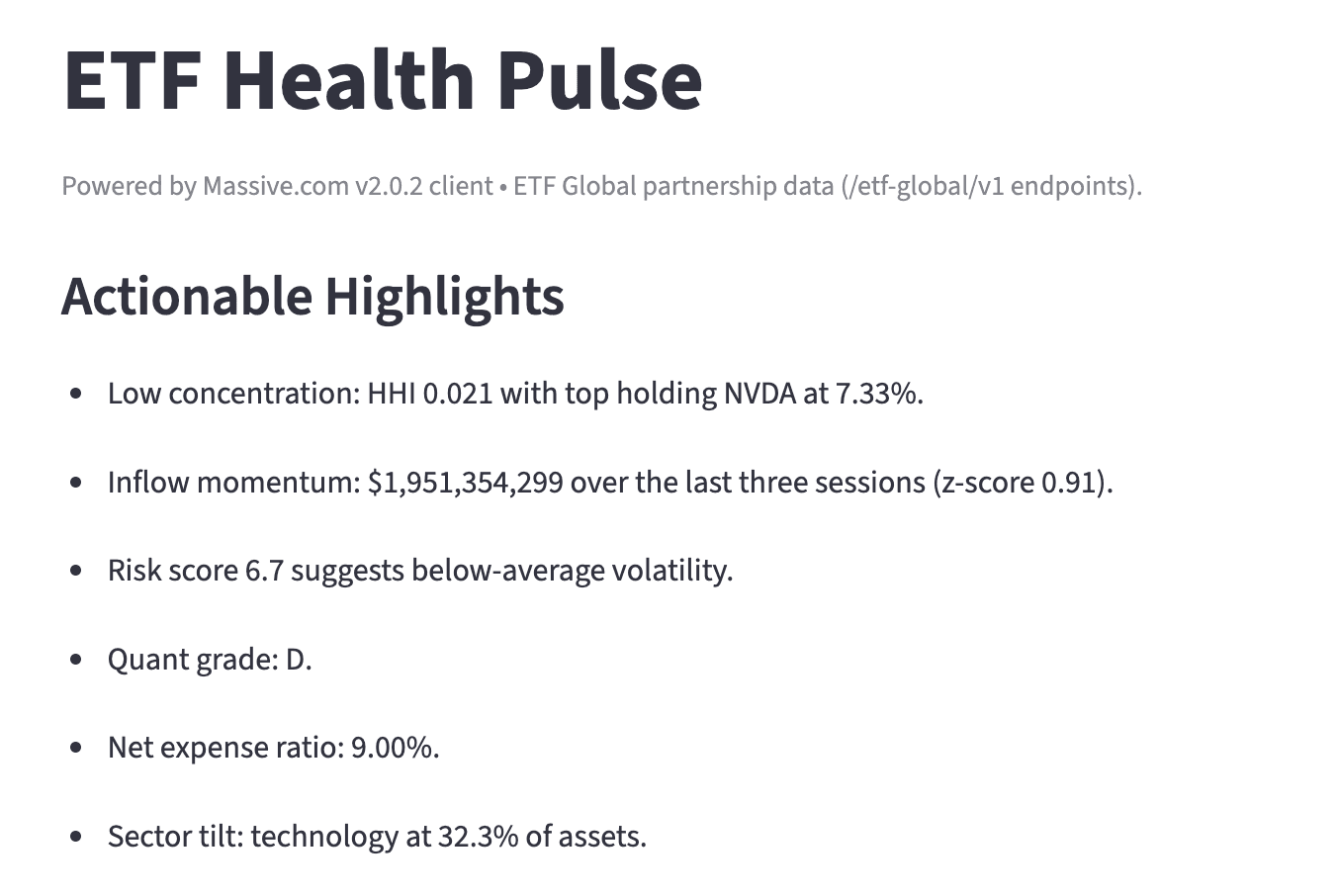
This section synthesizes multiple endpoints into plain-English insights:

Using ETF constituents data, the demo:
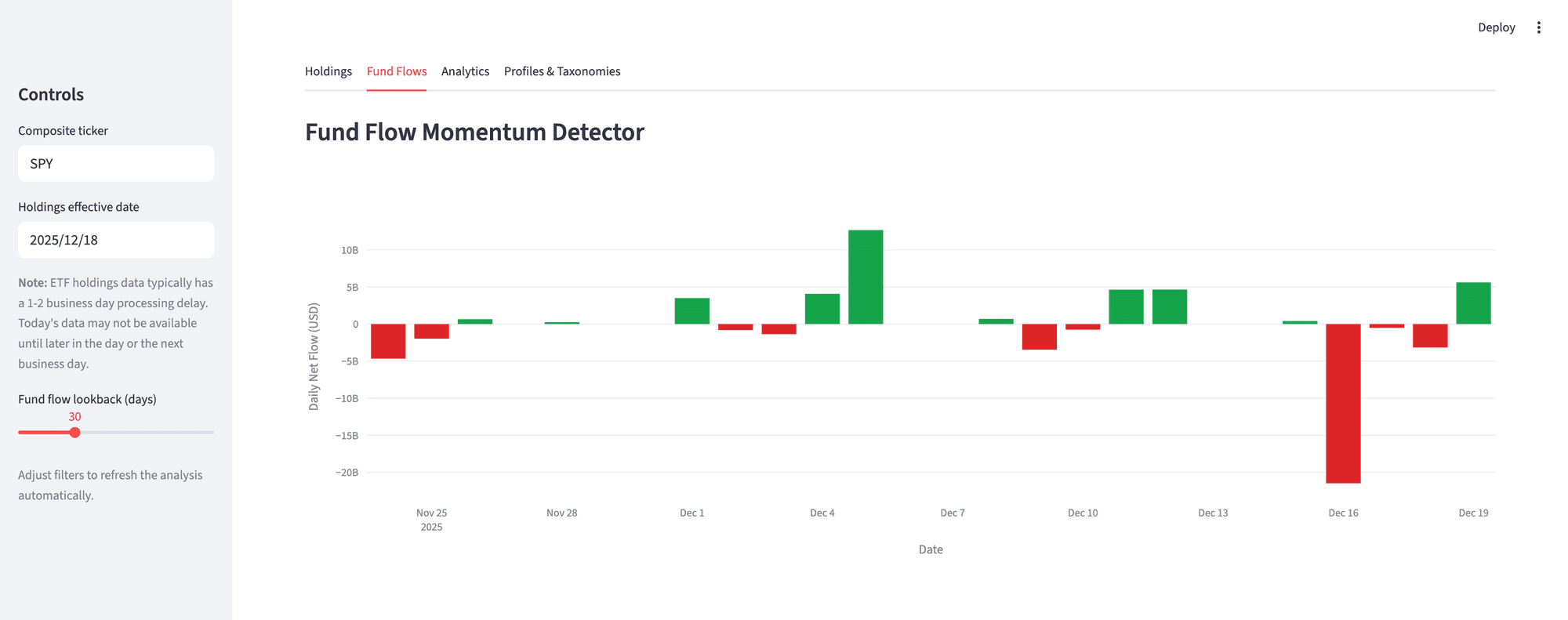
Powered by daily fund flows and NAV data, this panel:
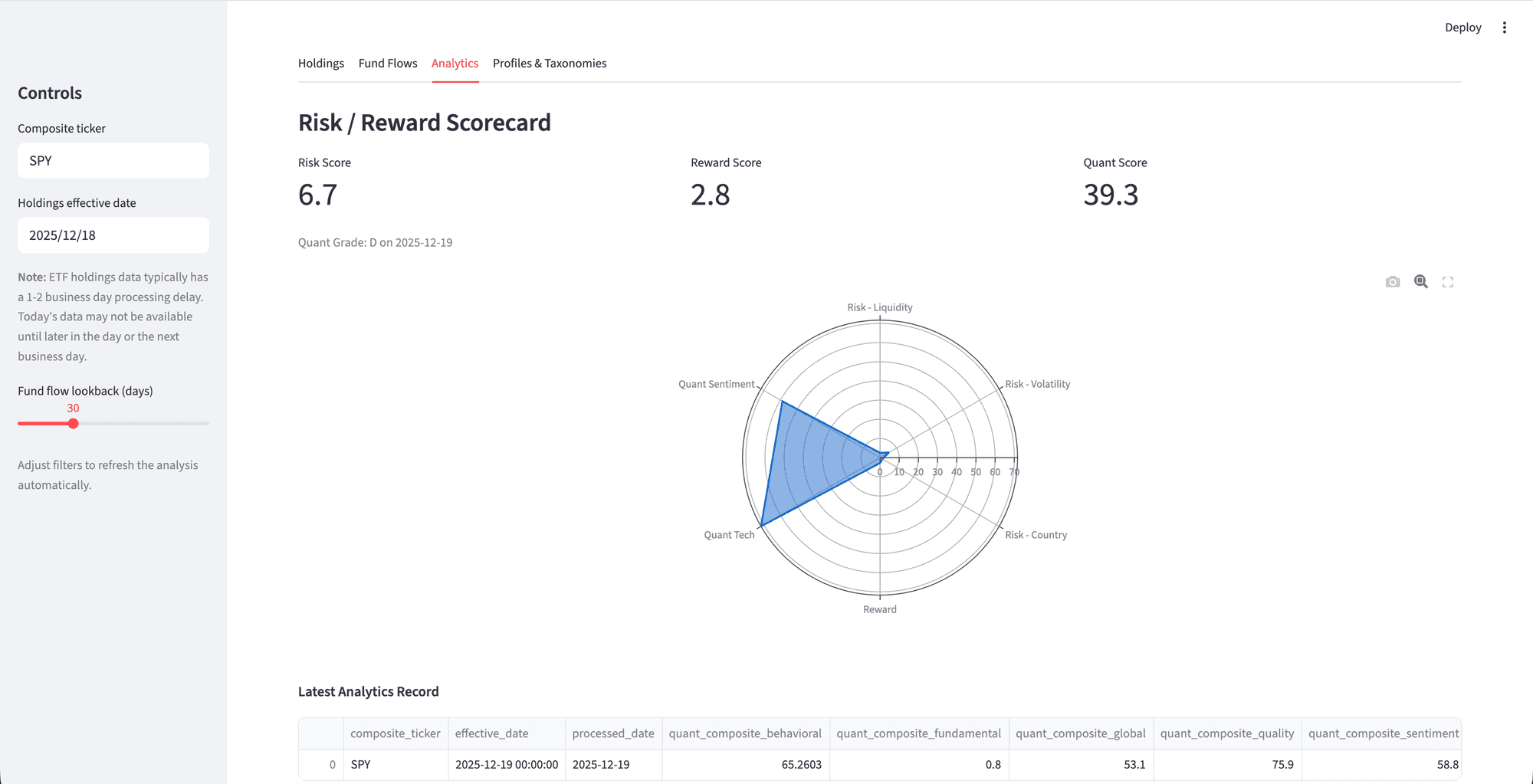
Using ETF Global®’s proprietary analytics, the dashboard:
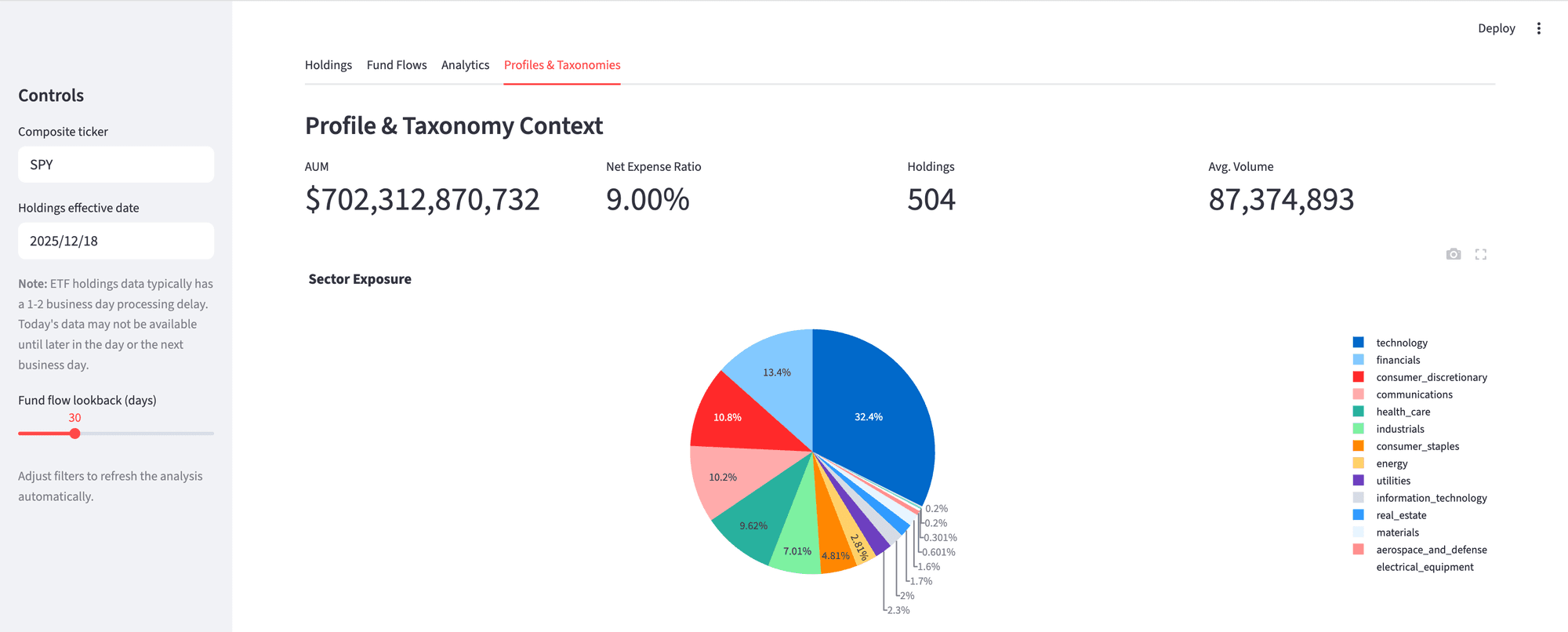
Finally, the demo pulls metadata and classifications to round out due diligence:
To keep the dashboard fast and responsive, the demo:
This demo is intentionally designed to be both educational and extensible. You can run it as-is to explore ETF Global® data, or use it as a reference for building your own research tools, dashboards, or production workflows on top of Massive’s API.
Clone the repo, add your API key, and start exploring ETF data at scale.

Alex Novotny
alexnovotny
See what's happening at Massive
Massive US stock data is now available to AI agents via x402. Pay per request in USDC on agent.massive.com, with no account or API key. Built with Coinbase.
editor

Starting August 17, 2026, Cboe's Options Exchange is extending trading hours for select single-stock equity options with a morning GTH session (7:30–9:25 am ET) and Curb session (4:00–4:15 pm ET).

cole

A SEC 8-K API that labels what actually happened. Query filings by event type (CEO departures, cybersecurity incidents, M&A), with source-cited tags.

rian