
Massive Adds x402 Payments Access for AI Agents with Coinbase
Massive US stock data is now available to AI agents via x402. Pay per request in USDC on agent.massive.com, with no account or API key. Built with Coinbase.

editor

Introducing
Feb 4, 2026
In this tutorial, you’ll build a small terminal “scanner” that streams every US options trade in real time and prints a clean summary only when the trade’s premium is large enough to matter.
Under the hood, we connect to the Massive Options Trades WebSocket, subscribe to the options trades stream (T.*), compute premium (price × contracts × 100), and display the trade with a readable timestamp and parsed contract details.
Who this is for: Python developers who want a fast “tape” view of live options prints, even if you’re still getting comfortable with OSI symbols.
You must have a Massive Options Advanced plan for this demo to work properly.
A reusable options trade scanner that:
Monitoring large options trades, often called "whale orders," is a key strategy for many traders because these large-volume transactions can signal the intent of institutional investors or sophisticated players.
By filtering for trades that cross a high premium threshold, traders can effectively cut through market "noise" and focus on prints that represent significant capital commitment. This type of flow can indicate a strong conviction about a stock's future direction, potentially providing early insight into a major market move that can be leveraged for trade ideas.
In order to run the demo, you’ll need:
You can find the full code for this demo in the Massive community repo.
The snippets below are simplified; check the repo for the exact implementation and latest updates.
Note: Market hours matter. You will not get many if any results outside of the standard exchange operating hours. .
The script is made up of a little over 100 lines of code. Let's deep dive into the various functions that make up this options scanner.
Options trades come through with a full contract symbol. We parse out the underlying root, option type, and strike. This makes the output much easier to scan.
def parse_contract(sym: str):
    s = sym.upper()[2:] if sym.upper().startswith("O:") else sym.upper()
    m = RE_FULL.match(s)
    if not m:
        return s, "N/A", None
    root, _, cp, k = m.groups()
    root = "SPX" if root == "SPXW" else root
    opt_type = "Call" if cp == "C" else "Put"
    strike = int(k) / 1000.0
    return root, opt_type, strike
Why divide strike by 1000? OSI strike encodes the price in thousandths. For example, 00450000 becomes 450.000.
As stated earlier, market hours matter. Trades arrive with a millisecond epoch timestamp. Convert it to a readable Eastern-time string.
def et(ms: int) -> str:
    return datetime.fromtimestamp(ms / 1000, tz=ZoneInfo("America/New_York")).strftime(
        "%Y-%m-%d %H:%M:%S %Z"
    )
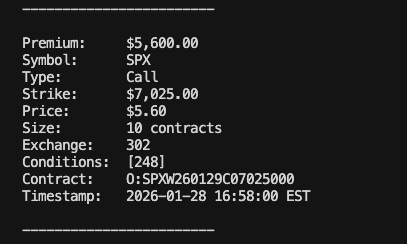
This section serves as a pretty printer. Premium is the total dollar value of the trade:premium = price × contracts × 100 (because one standard equity option contract represents 100 shares).
def show_trade(sym: str, price: float, size: int, ts: int, exchange=None, conditions=None):
    root, opt_type, strike = parse_contract(sym)
    prem = price * size * 100
    pl = lambda L, V, w=12: f"{(L + ':'):<{w}} {V}"
    print(
        "\n".join(
            [
                "",
                pl("Premium", f"${prem:,.2f}"),
                pl("Symbol", root),
                pl("Type", opt_type),
                pl("Strike", f"${strike:,.2f}" if strike is not None else "N/A"),
                pl("Price", f"${price:.2f}"),
                pl("Size", f"{size} contracts"),
                pl("Exchange", exchange or "N/A"),
                pl("Conditions", conditions or "N/A"),
                pl("Contract", sym),
                pl("Timestamp", et(ts)),
                "",
                "------------------------",
            ]
        ),
        flush=True,
    )
The main loop does three things:
def main():
    parser = argparse.ArgumentParser(description="Stream options trades filtered by minimum premium.")
    parser.add_argument(
        "amount",
        nargs="?",
        type=float,
        default=DEFAULT_MIN_PREMIUM_USD,
        help=f"Minimum premium in USD (default: {DEFAULT_MIN_PREMIUM_USD:,.0f})",
    )
    args = parser.parse_args()
    min_premium_usd = args.amount

    c = WebSocketClient(api_key=API_KEY, market=Market.Options)
    c.subscribe("T.*")
    print(f"[info] connecting to options trade stream (T.*) — filter: ≥ ${min_premium_usd:,.0f} premium", flush=True)

    def handler(msgs):
        for m in msgs:
            price, size = float(m.price), int(m.size)
            prem = price * size * 100
            if prem < min_premium_usd:
                continue
            show_trade(
                m.symbol,
                price,
                size,
                int(m.timestamp),
                getattr(m, "exchange", None),
                getattr(m, "conditions", None),
            )

    try:
        c.run(handler)
    except KeyboardInterrupt:
        pass
    finally:
        c.close()
We've made the demo easy to run since we are using uv.
In your terminal, all you have to type in is:
uv run main.py
By default, this is look for all trades with premiums over $100,000. You can change this value with a simple command line argument. Entering 0 will return all options.
uv run main.py 10000
Stop the stream anytime with Ctrl+C.
A few quick tweaks you can make once the basic scanner is working:
If you’re not seeing trades:
Again, you can find the full code for this demo in the Massive community repo.
This content is for educational purposes only and does not constitute investment advice or a recommendation to buy or sell any securities. Massive is a market data provider, not a broker-dealer or investment adviser. The data and code samples provided by Massive are offered on an "as-is" basis without any warranty of accuracy, completeness, or timeliness. Options trading involves substantial risk of loss and is not suitable for all investors. You are solely responsible for your use of the data provided by Massive, this information, and for compliance with all applicable laws and data licensing requirements.

Cole Power
cole
See what's happening at Massive
Massive US stock data is now available to AI agents via x402. Pay per request in USDC on agent.massive.com, with no account or API key. Built with Coinbase.
editor

Starting August 17, 2026, Cboe's Options Exchange is extending trading hours for select single-stock equity options with a morning GTH session (7:30–9:25 am ET) and Curb session (4:00–4:15 pm ET).
cole
A SEC 8-K API that labels what actually happened. Query filings by event type (CEO departures, cybersecurity incidents, M&A), with source-cited tags.

rian