
Massive Adds x402 Payments Access for AI Agents with Coinbase
Massive US stock data is now available to AI agents via x402. Pay per request in USDC on agent.massive.com, with no account or API key. Built with Coinbase.

editor
Introducing
Oct 29, 2026
In this post, you build a cap-weighted heatmap of every US large cap, about 730 stocks, without writing the code yourself. You describe the app to Claude Opus 5.5 in Claude Code, four prompts in all, and it writes the backend, the universe builder, and the browser app. Massive's full market snapshot returns the latest price for every US ticker in a single request, and that one call is enough to drive a live market heatmap.
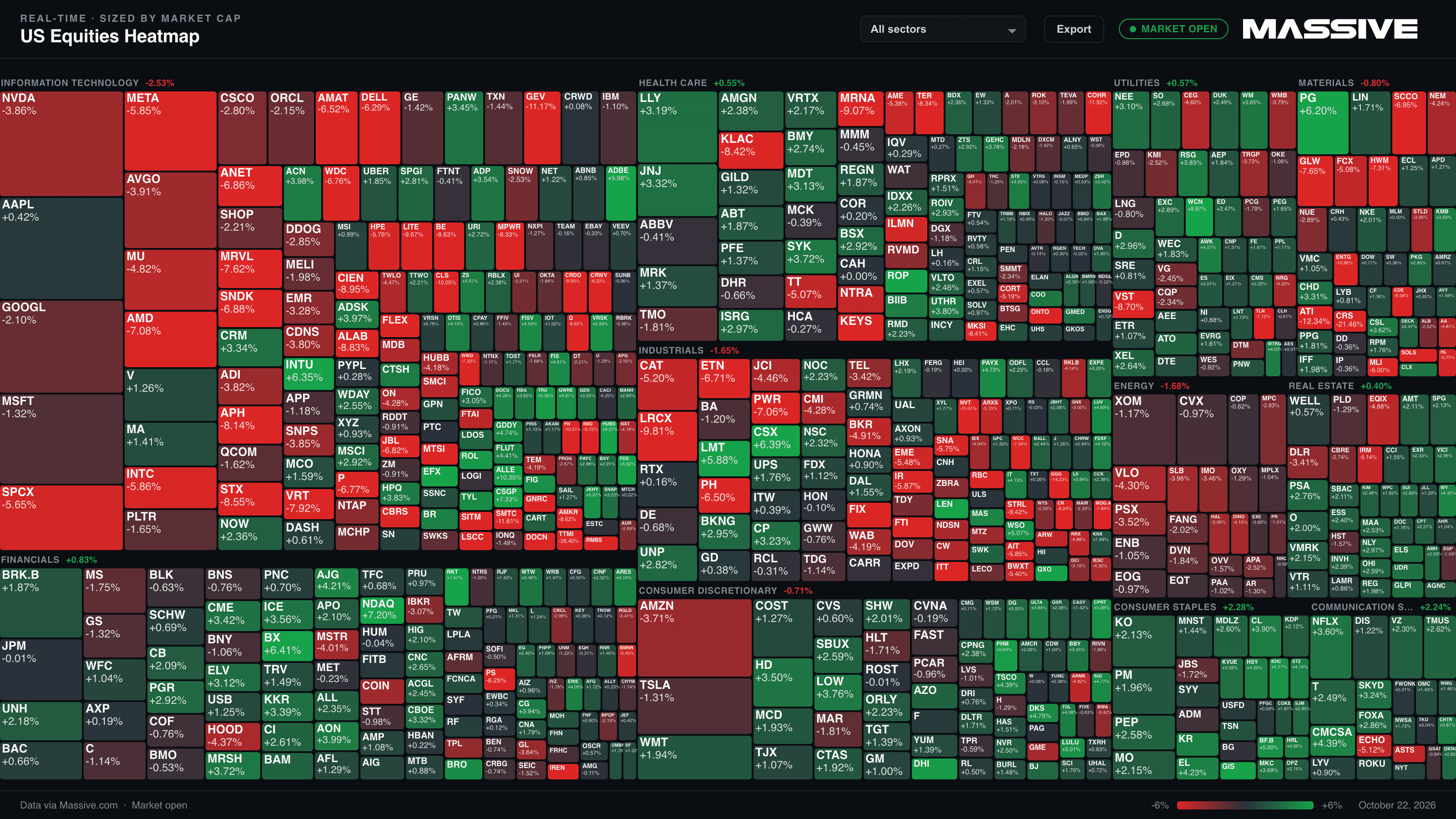
Say the S&P 500 closes up 0.4%. That number can't tell you whether 400 stocks rose together or three giants did all the work while the rest sat still. A heatmap shows the difference at a glance:

In this sketch, Information Technology is broadly green, Financials are flat and Energy is selling off. You can read the day before you read a single number: color tells you how far a stock moved, and size tells you how much that move matters.
Most heatmaps stop at the S&P 500. This one covers every US large cap, worth $10 billion or more, with a view for each sector, but you can make it show whatever you'd like once you understand the basics, which we will go over in this tutorial.
Open Claude Code in an empty folder and send the four prompts below in order, letting each step finish before the next. Each prompt includes the Massive details a model can't guess: which endpoint returns the whole market in one call, which fields to read, and how to handle details like share classes.
The browser never calls Massive directly. A small Node backend holds the API key and makes every request.
Tip. If Claude is unsure of a field or parameter, point it at massive.com/docs.
Start with the skeleton and the one object everything else is built around: the tile.
Prompt 1 · paste into Claude Code
Build a live US stock market heatmap as a TypeScript project: a
Node backend on port 8787 and a React + Vite frontend that
proxies /api to the backend. `npm run dev` should start both.
Read MASSIVE_API_KEY from .env and never send it to the browser.

Every tile is one object with these fields: ticker, name, group
(sector), marketCap, priorClose, price, and pct =
(price - priorClose) / priorClose. Put that type in a shared
folder both sides import.

Stub the two endpoints for now: GET /api/snapshot returns the
full tile list for a view, GET /api/prices returns { session,
updates: [{ ticker, price, pct }] }.
Four tile fields come from a universe file and never change while the app runs, two come from Massive, and one is calculated. Each refresh only carries a new price.
| Field | Source | Description |
|---|---|---|
| ticker | Universe file | Symbol, for example AAPL. Identifies the tile in every update. |
| name | Universe file | Company name, shown in the tooltip. |
| group | Universe file | Sector. Sets which block the tile sits in. |
| marketCap | Universe file | Sizing weight. Sets how large the tile is. |
| priorClose | Snapshot | The previous session's close, which the move is measured from. |
| price | Snapshot | The current price, refreshed on every poll. |
| pct | Calculated | (price - priorClose) / priorClose. Sets the color. |
Prices for the whole market come in a single response object, but market cap and sector come from a per-ticker endpoint, so sizing and grouping the market takes thousands of requests. That's too slow for page load, so a build step writes them to a file once.
Prompt 2 · paste into Claude Code
Add a script, `npm run build-universe`, that writes
universes/us-equities.json using the Massive REST API:

1. List every active US common stock from /v3/reference/tickers
   (market=stocks, type=CS, active=true), following next_url
   until it runs out.
2. Call the full market snapshot once and keep only tickers
   whose dollar volume in the last completed session clears a
   floor (default $1,000,000, the first CLI argument). Dollar
   volume is prevDay.vw * prevDay.v. Use prevDay, not today's
   partial day.
3. Only for the survivors, fetch /v3/reference/tickers/{ticker}
   to get market_cap, name, sic_code and cik. Run those requests
   with modest concurrency.
4. Keep only tickers with a market_cap of at least
   $10,000,000,000 (the second CLI argument).
5. Map sic_code to these eleven sectors: Information Technology,
   Health Care, Financials, Consumer Discretionary, Consumer
   Staples, Industrials, Energy, Materials, Utilities, Real
   Estate, Communication Services. Match the exact 4-digit code
   first, then the first 3 digits, then the 2-digit major group.
6. Drop tickers with no sic_code instead of guessing a sector.
7. Share classes of one company (GOOG and GOOGL, BRK.A and
   BRK.B) each report the whole company's market_cap. Of the
   tickers left, keep one per cik: the one with the highest
   dollar volume.

Print a per-sector count when the build finishes.
The $10B market-cap floor is the usual line for large caps, and it keeps nearly every tile big enough to label. Market cap only comes with the detail calls, so the dollar-volume floor runs first to cut how many you make. Dollar volume uses VWAP rather than the close because VWAP reflects the whole session. Using the last completed session keeps builds consistent; today's partial volume would shrink the universe in the morning.
Ticker details include a SIC code, the industry code the SEC assigns to every company that files with it. SIC 3571 is "ELECTRONIC COMPUTERS" (Apple) and 7372 is "SERVICES-PREPACKAGED SOFTWARE" (Microsoft). Step 5 rolls these up into the eleven sectors most heatmaps use.
market_cap is a company-wide figure, so every listed share class carries it: GOOGL and GOOG both report Alphabet's full value. Step 7 keeps one tile per company, its most-traded class, so Alphabet and Berkshire Hathaway each appear once. It runs last so a company stays in as long as any of its classes qualifies.
Run npm run build-universe. Our build produced 727 stocks, from 164 in Information Technology to 21 in Communication Services.
The app loads a view once, then polls for current prices on a timer.
Prompt 3 · paste into Claude Code
Implement the two backend endpoints against Massive.

Prices: call the full market snapshot
(/v2/snapshot/locale/us/markets/stocks/tickers with no tickers
parameter) once per request and filter it to the current view.
For each ticker, price is the first of lastTrade.p, day.c and
prevDay.c that is above 0. priorClose is prevDay.c. Cache the
snapshot result for 1 second so several open tabs share one
upstream call.

Add a session field (pre-market, regular, after-hours, closed)
computed in America/New_York time.

In the frontend, poll /api/prices every 2 seconds. Skip a tick
if a snapshot load or the previous poll is still in flight, so
slow responses can't stack up, and keep the last good prices if
a request fails.
The full market snapshot returns every US ticker in one request, about 13,000 rows and 8 MB, whether you're viewing one sector or the whole market. The browser receives only the filtered slice, about 120 KB when the full market loads and about 40 KB per poll.
The fallback chain matters before the open. Until a stock trades for the first time that day, its lastTrade and day fields are empty, so the tile uses the prior close and shows no change.
The last prompt draws the heatmap and adds the controls.
Prompt 4 · paste into Claude Code
Render the view as a canvas heatmap grouped by sector, with a
header on each sector showing its cap-weighted average change.

Size tiles by Math.sqrt(marketCap) so the largest companies
don't crowd out everything else. Color by pct on a diverging
scale: neutral gray (#2A313A) at 0, green (#16A34A) for gains,
red (#DC2626) for losses, reaching full color at ±6%. Tiles with
no priorClose are gray. Only draw a label where the tile is at
least 11 x 7 px.

Open on the full universe, with a dropdown for All sectors plus
one view per sector, filtered from the same file. Scroll zooms
toward the cursor, drag pans, double-click resets. Hovering a
tile shows ticker, name, price, prior close and percent change.
Show the session as a badge in the top bar.

Add an Export button that saves a 16:9 PNG at 2x (3200 x 1800)
with a title, session, date and legend.
The clamp is the move at which a tile reaches full color; anything larger looks the same. At ±6%, a stock up 2% is a third of the way to full green, and a 10% move reads the same as a 6% one.
Square-root sizing trades accuracy for readability. With raw market cap, the largest companies crowd everything else into unlabeled slivers. The square root keeps the order but compresses the range, so tile area understates how big the giants are.
Run npm run dev. It starts the backend on port 8787 and the frontend on the port Vite prints (usually http://localhost:5173), which forwards API requests to the backend. Open the frontend URL. At default zoom nearly every tile has a label; scroll to zoom in on the smallest.
The session badge tells you whether a still screen means a quiet market or a closed one. On Starter, everything on screen is 15 minutes behind.
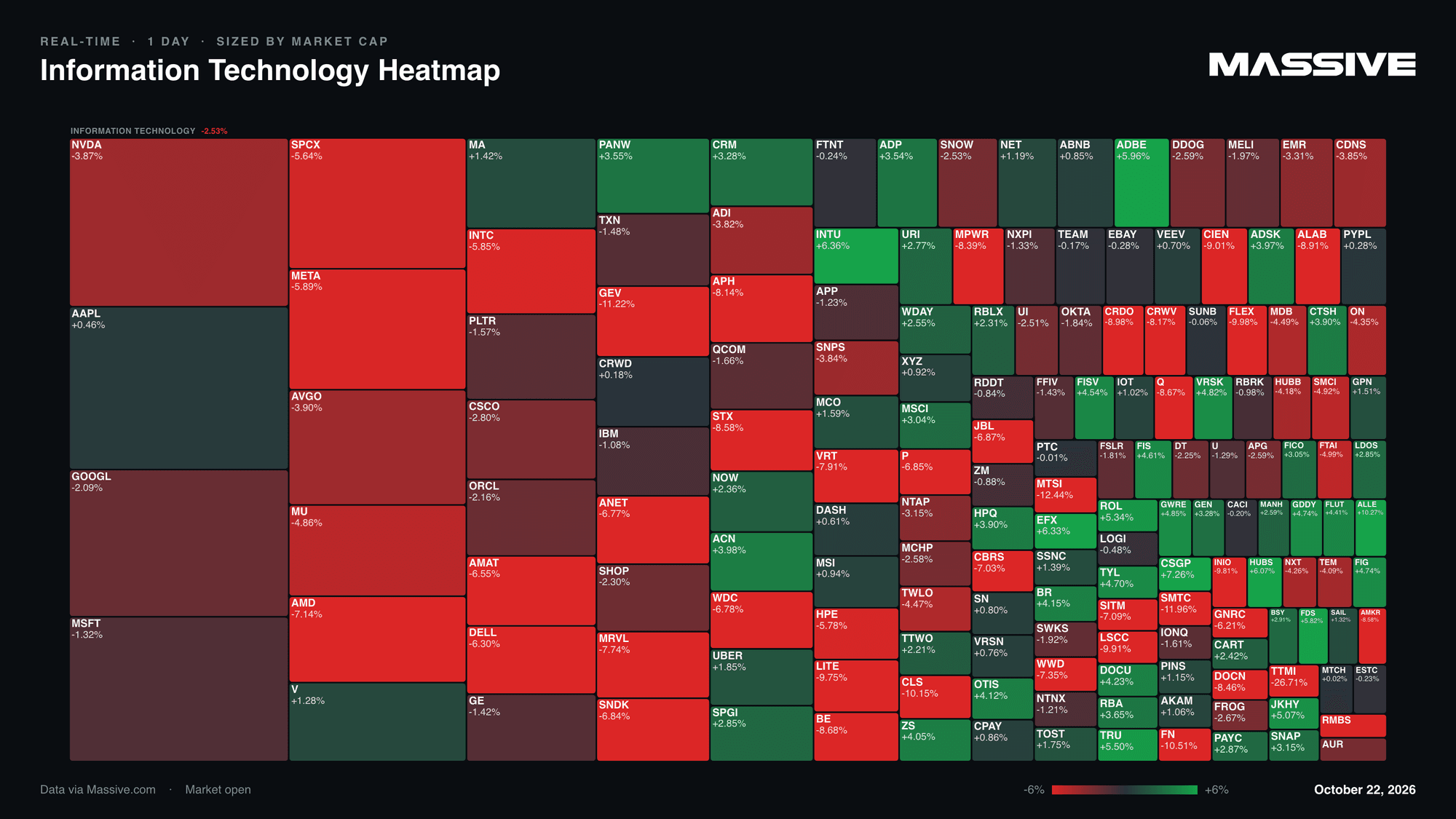
Output · Information Technology view
Keep it current. Market caps, liquidity and listings drift, so re-run
npm run build-universenow and then.
Once the base app works, the sky is the limit for further enhancements. Try these prompts:
This content is for educational purposes only. Nothing in this post constitutes investment advice or a recommendation to buy or sell any securities. The examples, demos, and outputs produced with this project are generated by artificial intelligence and large language models, may not always be accurate, and may contain material inaccuracies even where they appear precise. You should not rely on any output without independently confirming its accuracy. Verify results before making any trading decisions.

Cole Power
cole
See what's happening at Massive
Massive US stock data is now available to AI agents via x402. Pay per request in USDC on agent.massive.com, with no account or API key. Built with Coinbase.
editor

Starting August 17, 2026, Cboe's Options Exchange is extending trading hours for select single-stock equity options with a morning GTH session (7:30–9:25 am ET) and Curb session (4:00–4:15 pm ET).
cole

A SEC 8-K API that labels what actually happened. Query filings by event type (CEO departures, cybersecurity incidents, M&A), with source-cited tags.

rian