
Massive Adds x402 Payments Access for AI Agents with Coinbase
Massive US stock data is now available to AI agents via x402. Pay per request in USDC on agent.massive.com, with no account or API key. Built with Coinbase.

editor
Introducing
Sep 15, 2026
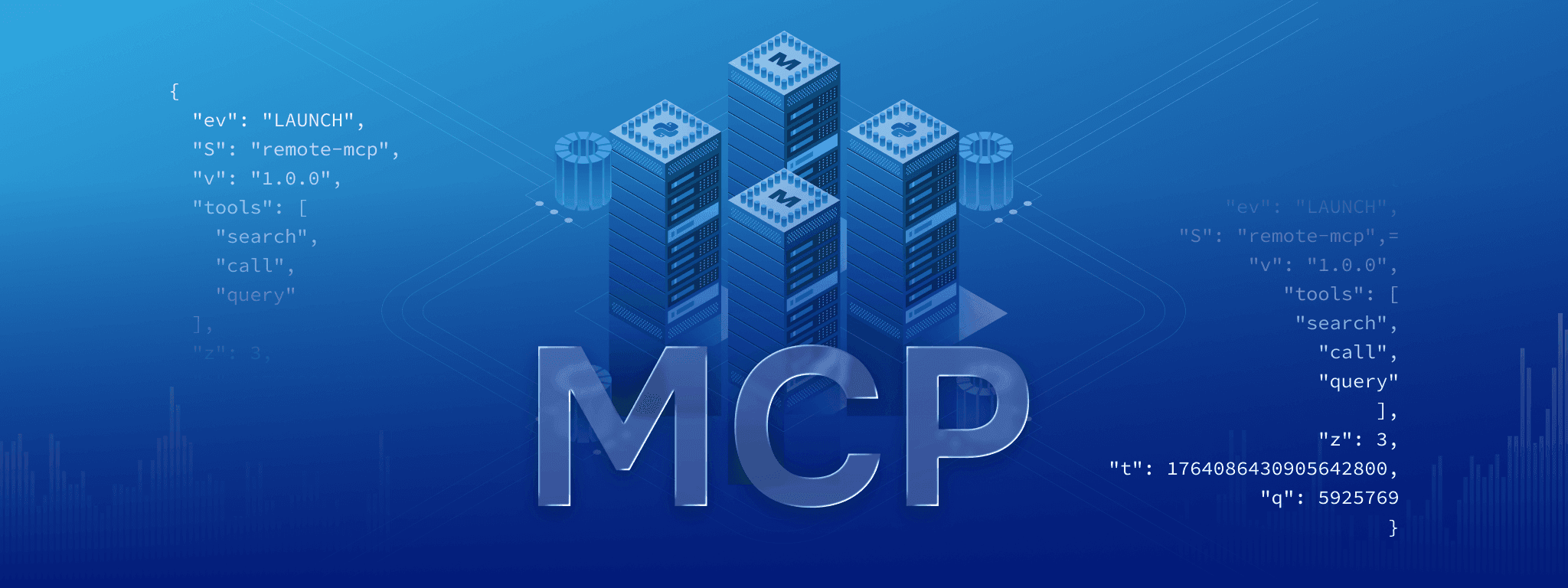
The Massive remote MCP server connects AI assistants directly to our U.S. market data, authenticates over OAuth, and works with ChatGPT, Claude, Cursor, Gemini, Grok, and more. There is nothing to install and no API key to store. Sign in once and start asking questions. Setup guides for every supported client are in the AI tools Quickstart. Before MCP, you could ask an AI assistant how to retrieve market data. Now you can just ask the market.
Until now, putting market data in front of a model meant writing the integration yourself. You picked the endpoints, wired up auth, handled pagination, and hoped the model's idea of the response shape matched the real one. The remote MCP server removes that whole layer. The model searches our endpoints in natural language, reads the real parameter documentation, and makes the call itself, so it is working from the actual APIs rather than guessing at them.
The Model Context Protocol (MCP) is an open standard Anthropic introduced in late 2024. It is now supported across the major AI clients, and it gives models one way to use external tools and data. Before MCP, every assistant and every data source needed its own integration. With MCP, a server exposes a set of tools, and any compatible client can call them.
A remote MCP server is simply one that runs on the provider's infrastructure rather than on your machine. You add it in your client, authenticate in the browser over OAuth, and the client handles the rest. Nothing runs locally, nothing needs to be updated or installed, and there is no key sitting in a config file.
A model with MCP access does not just describe how to get data. It gets the data, looks at it, and acts on what it finds, then does that again in a loop. Instead of asking your AI to write code that you then run to find out how every sector performed this month, you can simply ask, "How did every sector perform this month?"
Setup takes about two minutes and happens once. You add https://mcp.massive.com/ to your client, sign in through the browser, and that is it. There is no API key to copy and nothing to install.
The AI tools Quickstart has instructions for every supported client, including Claude Code, Claude Desktop, Cursor, ChatGPT, Grok, Codex, GitHub Copilot, and the Gemini CLI.
Access follows your Massive plan. You can query any asset class your subscription includes. A free Basic account is enough to connect and start asking. Create one here if you don't have an account yet.
From here, just ask a market question.
Each example below is a single prompt against a freshly connected client. The first joins two endpoints, the second builds an earnings table from quarterly filings, and the third runs a full pipeline across roughly 500 tickers in the S&P 500. Nothing was set up in advance.
Let’s start with something familiar. Ask your AI to analyze a stock's historical price over the past few years and show an overlay of any stock splits.
"Fetch the aggregate daily bars for NVDA for the past 3 years. Can you also get the splits for this period? Then create a plot for NVDA and overlay the splits onto the graph."
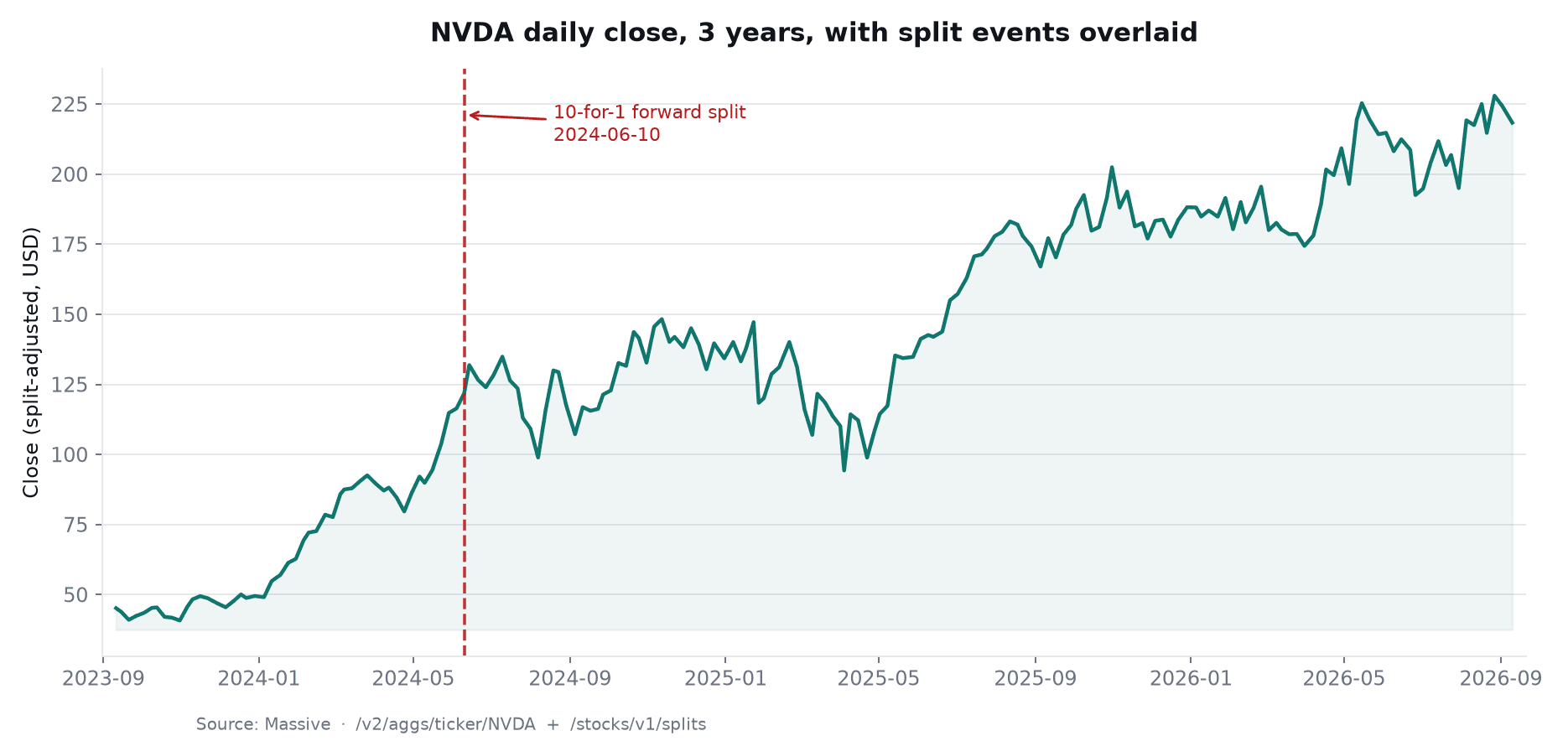
Three years of daily bars plotted with an overlay of the split history. As you can see, the window has one event, the 10-for-1 in June 2024. The price series is split-adjusted, so that event lands as an annotation rather than an abrupt price change. The model works that out and marks it correctly without being told.
Done by hand, this is finding two endpoints, writing the fetch and pagination, normalizing two date formats, wiring up the plot, then debugging why the split marker sits in the wrong place. Here it is one prompt and about a minute.
Market research often requires pulling information across multiple quarters, calculating additional metrics, and turning the result into something you can actually analyze. Your AI can do that work directly against Massive data.
"Pull the past 3 years of NVDA quarterly earnings and put them into a table so I can view them."
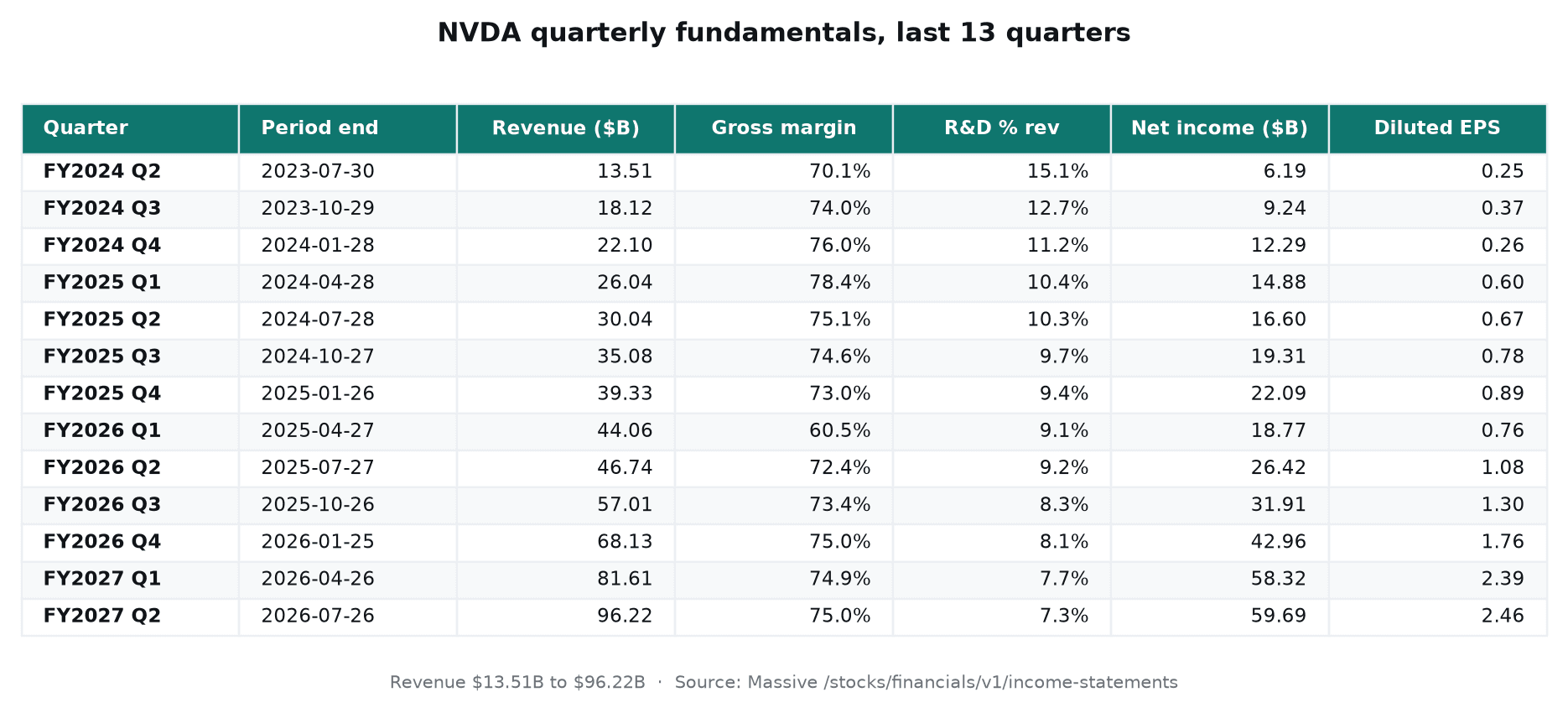
Thirteen quarters over three years, assembled into one continuous view, with revenue running from $13.51B to $96.22B. Gross margin and R&D intensity are not fields in the response. The model derives both. The FY2026 Q1 margin dip to 60.5% then falls straight out of the table instead of having to be looked up.
Done by hand, this is querying the financials endpoint, working out that fiscal quarters do not line up with calendar quarters, ordering records across fiscal-year boundaries, computing the derived columns, and formatting the result. This used to be a solid day's work but now it is one prompt and about two minutes of work.
Now move from one company to the whole market. Massive also includes a range of partner datasets. This example uses ETF Global constituents to build a sector map, then pulls prices for every ticker on it.
"Pull partner data for the S&P 500 sectors, then get price data for each of the stocks, and generate a month-to-date heatmap based on weight."
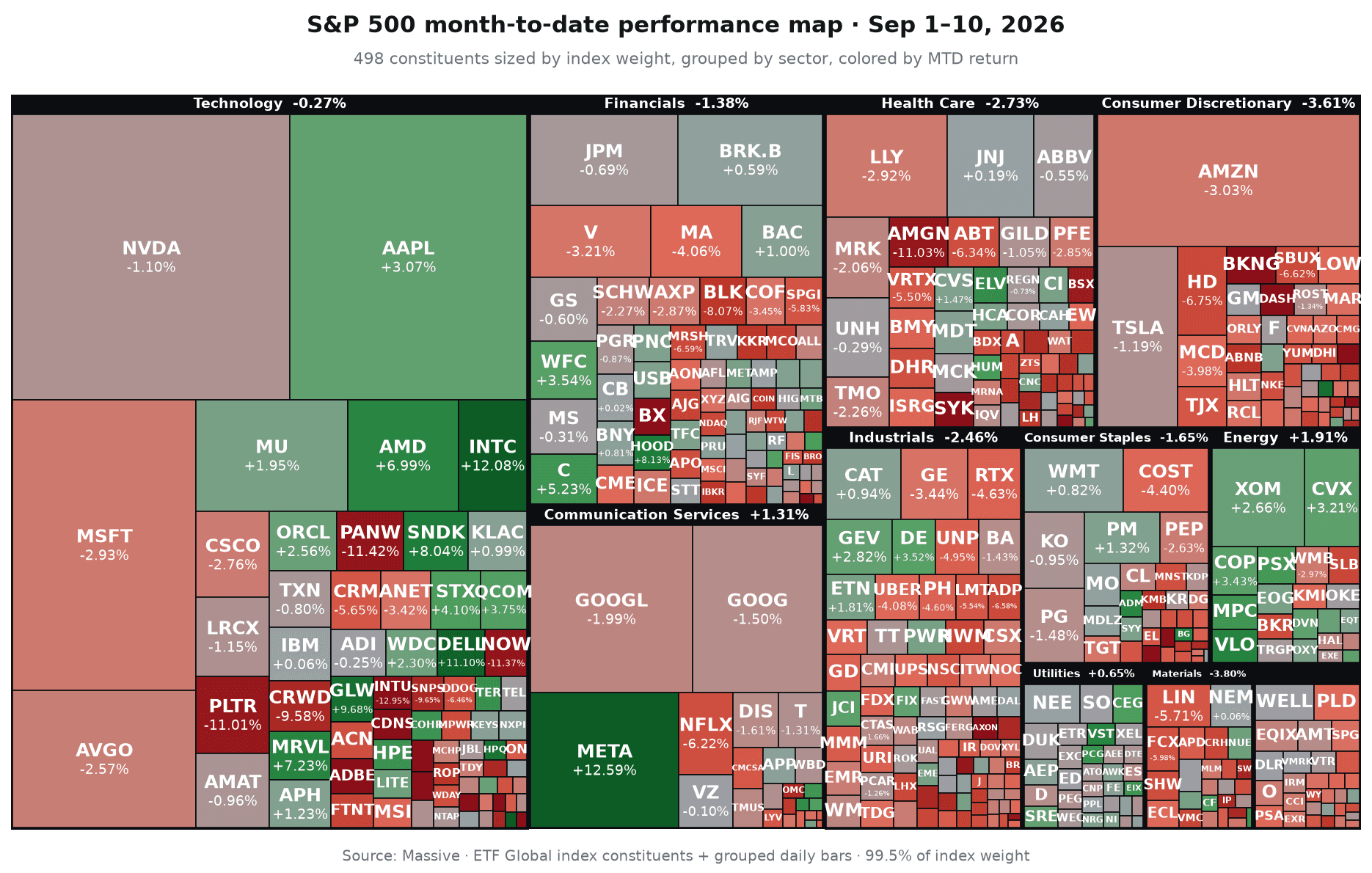
It starts with ETF Global constituents, one of our partner datasets, to resolve the holdings and weights. It pulls month-to-date prices for every name, computes returns, groups them by sector, and sizes each box by weight. That is 99.5% of the index on one screen.
Done manually, this requires sourcing index membership and weights, retrieving prices for roughly 500 companies, calculating returns, and building the visualization. Here it is one prompt and about three minutes.
The hosted MCP server is live. Add it from the AI tools Quickstart, sign in with a Massive account, and start asking market questions.
If you're a developer building more advanced AI workflows, we also publish a self-hosted version at github.com/massive-com/mcp_massive. It adds a local data workspace with in-memory DataFrames, SQL, and built-in financial functions including Greeks, returns, and technical indicators.
MCP is one of several ways to connect our data to AI systems. Our documentation is available as clean Markdown by appending .md to any docs URL, with llms.txt and llms-full.txt files at every level of the navigation tree. Client libraries in Python, JavaScript, Go, and Kotlin remain the right foundation for production code.
Already have Massive? Connect your AI and start exploring the market data included with your plan.
New to Massive? Create a free account and start asking questions.
Justin
editor
See what's happening at Massive
Massive US stock data is now available to AI agents via x402. Pay per request in USDC on agent.massive.com, with no account or API key. Built with Coinbase.
editor

Starting August 17, 2026, Cboe's Options Exchange is extending trading hours for select single-stock equity options with a morning GTH session (7:30–9:25 am ET) and Curb session (4:00–4:15 pm ET).

cole
A SEC 8-K API that labels what actually happened. Query filings by event type (CEO departures, cybersecurity incidents, M&A), with source-cited tags.

rian